Saturday, February 11, 2023

Samsung NP-R40 plus (Firenze2-R)

Samsung NP-R40 Plus Motherboard (Firenze2-R) Schematics & BIOS

Motherboard Specifications

The Firenze2-R is the internal motherboard designation for the classic Samsung NP-R40 Plus laptop series. This board represents an earlier era of laptop architecture, often utilizing Intel Core 2 Duo processors paired with an ATI Radeon chipset (such as the Radeon Xpress 200M/1250). It remains a popular board for technicians learning trace repairing and vintage laptop restoration.

  • Brand / Model: Samsung NP-R40 Plus
  • Motherboard Part Number: Firenze2-R (Rev 1.0)
  • Processor Support: Intel Core 2 Duo / Pentium Dual-Core
  • Memory Support: DDR2 RAM
Samsung NP-R40 Plus Firenze2-R Motherboard

Common Chip-Level Faults & Repair Notes

When working on the Samsung NP-R40 Plus (Firenze2-R), be aware of these common failure points due to its age:

  • Graphics/Chipset Failure: The ATI chipset on this board is prone to failure due to long-term heat exposure. Reballing or replacing the BGA chip is often necessary if you get no display but the fan spins.
  • Degraded Capacitors: Due to the age of the board, electrolytic capacitors may have dried out, causing random freezing or sudden power loss.
  • No Power: Always check the primary 19V rail near the DC jack. The protection MOSFETs on older Samsung boards often fail.

Free Download Section

1. Samsung NP-R40 Plus (Firenze2-R) Schematic Diagram (.PDF)

Trace power rails, component pins, and IC communication lines with the full schematic.
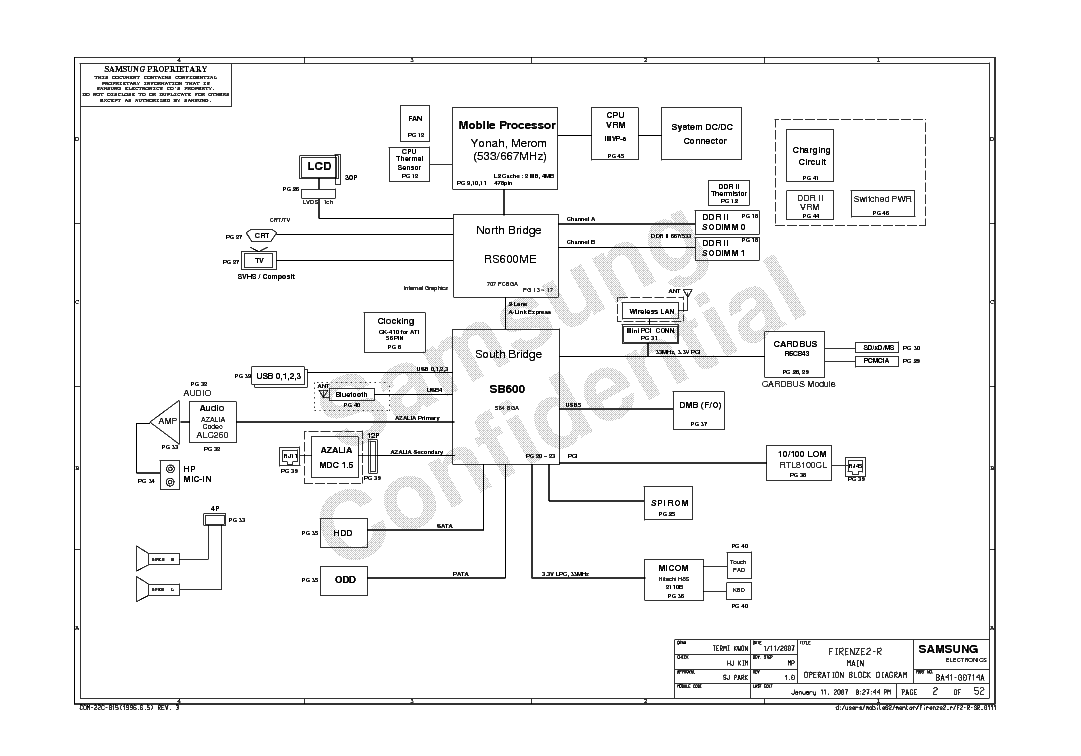
Samsung NP-R40 Plus Firenze2-R Schematics PDF

Download Schematics Free

2. Samsung NP-R40 Plus (Firenze2-R) Boardview File

A boardview file is extremely helpful for locating test points on older boards where silk screening might be sparse.

Samsung NP-R40 Plus Boardview Thumbnail

Board View Download Free (Coming soon)

If anyone has this board view file, please drop the link in the comments below!

Need BoardView Software? Download it Free Here.

3. Samsung NP-R40 Plus Clean BIOS + EC Bin File

Essential for fixing corrupted firmware resulting in no display or looping restarts.

⚠️ Always remember: Create a backup of your original BIOS chip before programming the new bin file so you can safely revert if necessary.

Samsung NP-R40 Plus BIOS Bin Download

BIOS + EC Bin Download Free (Coming soon)

lenovo_g500_compal_la-9632p_r1.0

Lenovo G500 Motherboard (Compal LA-9632P Rev 1.0) Schematics & BIOS Bin

Motherboard Specifications

The Compal LA-9632P (Rev 1.0) is the primary motherboard used in the Lenovo G500 laptop series. This board is built around the Intel HM76 Express Chipset and typically supports Intel 3rd Generation Core i3, i5, and i7 processors (Ivy Bridge). Some variations include discrete AMD Radeon graphics (like the HD 8570M or 8750M).

  • Brand / Model: Lenovo G500
  • Motherboard Part Number: Compal LA-9632P
  • PCB Revision: Rev 1.0
  • Chipset: Intel HM76
Lenovo G500 Compal LA-9632P Motherboard

Common Chip-Level Faults & Repair Notes

If you have a dead or malfunctioning Lenovo G500 (LA-9632P), here are key areas to inspect:

  • No Power (Dead): Check the DC-IN MOSFETs and the main 19V rail (B+). Short circuits in ceramic capacitors on the 19V line are common.
  • 3.3V / 5V Standby: Ensure the SY8208B/SY8208C standby ICs are outputting correct voltages. A hot standby IC usually points to a shorted KBC/EC (KB9012QF).
  • No Display: Very often linked to corrupted main BIOS or EC firmware. Programming the KB9012 EC and main BIOS is a standard fix.

Free Download Section

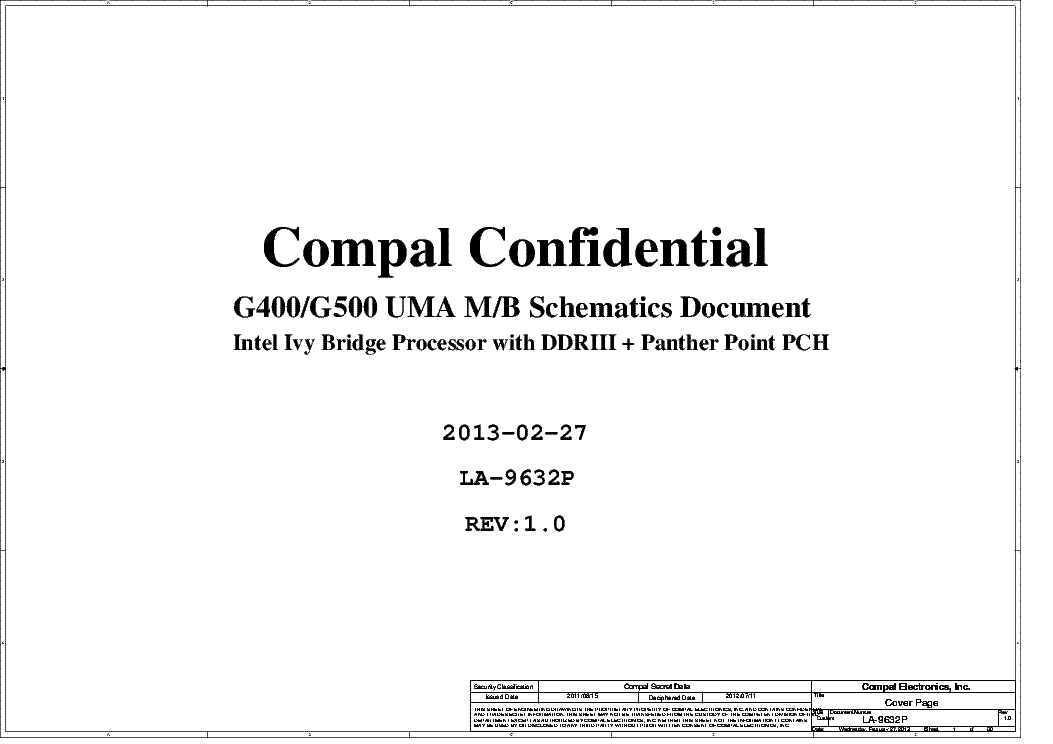
1. Lenovo G500 (LA-9632P) Schematic Diagram (.PDF)

Track component pins, power sequences, and trace layouts with this complete schematic PDF.

Lenovo G500 Compal LA-9632P Schematics PDF

Download Schematics Free

2. Lenovo G500 (LA-9632P) Boardview File

Find the exact physical location of any capacitor, resistor, or IC on the motherboard.

Lenovo G500 Compal LA-9632P Boardview

Board View Download Free (Coming soon)

If anyone has this board view file, please drop the link in the comments below!

Need BoardView Software? Download it Free Here.

3. Lenovo G500 Clean BIOS + EC Bin File

Dump files for the main BIOS and the KB9012 EC. Essential for fixing no-power, no-display, or corrupted firmware issues.

⚠️ Always remember: Create a backup of your original BIOS chip before programming the new bin file so you can safely revert if necessary.

Lenovo G500 Compal LA-9632P BIOS Bin Download

Download BIOS + EC Bin Free

Toshiba Satellite C850 C855 - INVENTEC DAKAR10F DAKAR10FG - 6050A2491301-MB-A02 MP - 20110905

Toshiba Satellite C850 / C855 (Inventec Dakar10F) Schematics & BIOS Bin

Motherboard Specifications

The Inventec DAKAR10F / DAKAR10FG is a very common motherboard found inside the Toshiba Satellite C850 and C855 models. This board typically features Intel's HM70 or HM76 chipset, supporting Intel 2nd and 3rd Generation processors (Sandy Bridge / Ivy Bridge), and uses standard DDR3 memory.

  • Brand / Model: Toshiba Satellite C850 / C855
  • Manufacturer / Code: Inventec DAKAR10F / DAKAR10FG
  • Part Number: 6050A2491301-MB-A02 MP
  • Chipset: Intel HM70 / HM76
Toshiba Satellite C850 C855 Inventec DAKAR10F Motherboard

Common Chip-Level Faults & Repair Notes

Before replacing the entire motherboard on a Toshiba C850 / C855, check these frequent failure points:

  • Corrupted BIOS: Extremely common on this series. The laptop may power on with a blank screen, or the fan will spin at 100% with no POST. A BIOS reflash (file provided below) often brings it back to life.
  • HM70/HM76 Chipset Failure: If the laptop powers on for exactly 30 minutes and then shuts off, you might have an HM70 chipset paired with an unsupported Core i3/i5/i7 (Intel anti-theft restriction) or a failing PCH.
  • No Power (19V Short): Inspect the ceramic capacitors around the CPU VRM and main power rail. A shorted capacitor will trigger the charger's protection circuit.

Free Download Section

1. Toshiba Satellite C850 / C855 (Inventec Dakar10F) Schematic Diagram (.PDF)

Analyze the power sequence and track down board components with the complete schematic.

Toshiba Satellite C850 C855 Schematics PDF

Download Schematics Free

2. Toshiba Satellite C850 / C855 (Inventec Dakar10F) Boardview File

Quickly locate any resistor, capacitor, or test point on both sides of the motherboard.

Toshiba Satellite C850 C855 Boardview

Download Boardview Free

Need BoardView Software? Download it Free Here.

3. Toshiba Satellite C850 / C855 Clean BIOS + EC Bin File

A corrupt BIOS can cause a "no display" issue even if the hardware is fine. Programming a clean BIOS is a crucial troubleshooting step.

⚠️ Always remember: Create a backup of your original BIOS chip before programming the new bin file so you can safely revert if necessary.

Toshiba Satellite C850 C855 BIOS Bin Download

Download BIOS Bin Free

Monday, February 6, 2023

Toshiba-Satellite-L500-LA-4982P

Toshiba Satellite L500 (Compal LA-4982P) Schematics & BIOS Bin

Motherboard Specifications

The Compal LA-4982P (KSTAA) is the primary motherboard used in the popular Toshiba Satellite L500 series laptops. These boards generally feature the Intel GM45 / PM45 chipset architecture paired with Core 2 Duo processors.

  • Brand / Model: Toshiba Satellite L500
  • Manufacturer: Compal
  • Board Number: LA-4982P (KSTAA)
  • Architecture: Intel Core 2 Duo / GM45 / PM45
Toshiba Satellite L500 Compal LA-4982P Motherboard

Common Chip-Level Faults & Repair Notes

If you're troubleshooting a dead Toshiba L500 / LA-4982P, consider these frequent issues:

  • NEC/Tokin Capacitor (Proadlizer) Failure: This era of Toshiba laptops is notorious for NEC/Tokin capacitor degradation under the CPU socket. Symptoms include the laptop shutting off abruptly under load, freezing, or only running on battery power. Replace it with 4x 330uF Tantalum capacitors.
  • No Display / Black Screen: Often caused by a corrupted BIOS or a failing Northbridge (GM45/PM45). Try flashing a clean BIOS first (provided below).
  • DC Jack / Power Issues: Check the input MOSFETs and the main 19V rail near the charging IC for shorts.

Free Download Section

1. Toshiba Satellite L500 (Compal LA-4982P) Schematic Diagram (.PDF)

Trace the 19V main power rail and diagnose charging or power sequence issues.

Toshiba Satellite L500 LA-4982P Schematics PDF

Download Schematics Free

2. Toshiba Satellite L500 (Compal LA-4982P) Boardview File

Notice: We are currently searching for this boardview.

Toshiba Satellite L500 LA-4982P Boardview Placeholder

Board View Download Free (Coming Soon)

If anyone has this boardview file for the LA-4982P, please share the link in the comments below!

3. Toshiba Satellite L500 (Compal LA-4982P) BIOS + EC Bin Download

A corrupt BIOS can cause a "no display" issue even if the hardware is fine. Below you will find the BIOS + EC bins, plus a `.rom` file option.

⚠️ Always remember: Create a backup of your original BIOS chip before programming the new bin file so you can safely revert if necessary.

Toshiba Satellite L500 LA-4982P BIOS Bin Download

Download BIOS + EC Bin

Download l500-13v.rom

Toshiba Satellite A350/A355 | KTKAA Los Angeles 10/10G LA-4571P REV 2.0

Toshiba Satellite A350 / A355 (Compal LA-4571P) Schematics & BIOS Bin

Motherboard Specifications

The Compal LA-4571P (KTKAA / Los Angeles 10/10G) is the core motherboard used in the Toshiba Satellite A350 and A355 laptop series. This architecture is based on the Intel Cantiga chipset and supports Intel Penryn processors. It comes with dedicated ATI graphics (M82 or M86).

  • Brand / Model: Toshiba Satellite A350 / A355
  • Motherboard Part Number: Compal LA-4571P (KTKAA / Los Angeles 10)
  • Processor Support: Intel Penryn (Core 2 Duo)
  • Chipset: North Bridge: Intel Cantiga | South Bridge: Intel ICH9-M
  • Graphics: ATI Mobility Radeon (M82 128/256MB or M86 256/512MB)
Toshiba Satellite A350 A355 Compal LA-4571P Motherboard

Common Chip-Level Faults & Repair Notes

If you're troubleshooting a dead or faulty Toshiba A350/A355 (LA-4571P), keep these points in mind:

  • Graphics Artifacts / No Display: The dedicated ATI graphics chip (M82/M86) is the most frequent cause of failure on this model due to thermal cycling. Reflowing or replacing the BGA chip is the standard solution.
  • NEC/Tokin Capacitor Issue: Like many Toshiba laptops of this generation, this board may suffer from a failing NEC/Tokin Proadlizer under the CPU socket. If the laptop crashes randomly or shuts down under load, replace the NEC/Tokin with 4x 330uF Tantalum capacitors.
  • No Power: Verify the 3.3V and 5V Always-On rails. Check the main 19V rail and the DC jack connector which can become loose over time.

Free Download Section

1. Toshiba Satellite A350/A355 (Compal LA-4571P) Schematic Diagram (.PDF)

Analyze the power sequence and track down board components with the complete Rev 2.0 schematic.

Toshiba LA-4571P Schematics PDF Page 1

Download Schematics Free

2. Toshiba Satellite A350/A355 (Compal LA-4571P) Boardview File

Quickly locate any resistor, capacitor, or test point on both sides of the motherboard.

Toshiba Satellite A350 A355 Boardview

Board View Download Free (Coming soon)

If anyone has this board view file, please drop the link in the comments below!

Need BoardView Software? Download it Free Here.

3. Toshiba Satellite A350/A355 Clean BIOS Bin File

A corrupt BIOS can cause a "no display" issue even if the graphics chip is fine. Programming a clean BIOS is a crucial troubleshooting step.

⚠️ Always remember: Create a backup of your original BIOS chip before programming the new bin file so you can safely revert if necessary.

Toshiba Satellite A350 A355 BIOS Bin Download

BIOS + EC Bin Download Free (Coming soon)
If anyone has this board bios bin file please share the link in the comment section below.

Acer Aspire 5742-compal-la-6582p-pew7181-uma

Acer Aspire 5742 Motherboard (Compal LA-6582P / PEW71) Schematics & BIOS Bin

Motherboard Specifications

The Compal LA-6582P (PEW71 UMA) is a motherboard designed for the Acer Aspire 5742 series laptops. This specific variant is an UMA architecture (Unified Memory Architecture), meaning it relies on Intel integrated graphics rather than a discrete GPU. It supports Intel Core i3 and i5 processors (Arrandale) with DDR3 RAM support.

Acer Aspire 5742 Compal LA-6582P Motherboard
  • Board Model: Compal LA-6582P (PEW71)
  • Graphics: UMA (Intel Integrated Graphics)
  • Supported Models: Acer Aspire 5742, 5742Z
  • Platform: Intel Arrandale

Common Chip-Level Faults & Repair Notes

When troubleshooting a dead or no-display Acer Aspire 5742 (LA-6582P board), check these common failure points:

  • No Power (19V Short): Verify the main 19V rail. Shorted ceramic capacitors near the CPU VRM are a common issue on this board.
  • 3V/5V Standby: Check if the standby IC is generating the ALW 3.3V and 5V. If 3.3V is missing and the IC is hot, the KBC/EC may be shorted.
  • Turns on but No Display: Often caused by a corrupted BIOS or issues with the CPU core voltage (VCC_CORE). Reflashing the BIOS/EC is the recommended first step.

Free Download Section

1. Acer Aspire 5742 (LA-6582P) Schematic Diagram (.PDF)

Use this schematic diagram to trace power lines, signals, and component pinouts for chip-level diagnostics.

Acer Aspire 5742 Compal LA-6582P Schematics PDF

Schematics Download Free

2. Acer Aspire 5742 (LA-6582P) Boardview File

A boardview helps locate component designations and traces physically on the board.

Acer Aspire 5742 Compal LA-6582P Boardview

Board View Download Free (Coming soon)

If anyone has this board view file, please comment the link below!

If you don't have BoardView Software, download it here: Board Viewer Software Free Download

3. Acer Aspire 5742 Clean BIOS + EC Bin File

Working SPI Flash dump to resolve no-display, fan spinning at full speed, and power loop issues.

Always remember: Backup your old BIOS chip and save it to a USB or hard drive before flashing.

Acer Aspire 5742 Compal LA-6582P BIOS Bin Download

BIOS + EC Bin Download Free

Featured Post

The Battle of Browsers: Microsoft Edge vs. Google Chrome

The Battle of the Browsers (2024): Microsoft Edge vs. Google Chrome In the vast landscape of web browsers, two heavyweigh...

Translate

AdBlock Detected!

Please support Genius Mind Technologies by disabling your AdBlocker. We rely on ads to keep our massive library of free schematics, boardviews, and BIOS bin files free for everyone.