Friday, July 31, 2026

Upgrade Your Shop Today: Introducing the Genius Mind POS System! 🚀

 Tired of messy repair tickets, misplaced stock, and complicated checkouts? We know exactly how hectic it gets behind the counter of a busy repair center and retail shop. That is exactly why we built the Genius Mind Retail & Repair Shop Management POS!


Designed specifically for the local market, our new hybrid offline-first software ensures you never stop selling, even if the internet goes down.

Why you’ll love it:

  • 📱 Smart WhatsApp Integration: Send receipts and quotes digitally!

  • 🛠️ Dedicated Repair Tickets: Track every device from drop-off to delivery.

  • đŸ“Ļ Complete Stock Control: Real-time inventory and low-stock alerts.

  • 🇱🇰 Bilingual: Fully supports both English and Sinhala.

🎁 Try it 100% FREE for 30 Days!

Ready to transform your business?  👉 Download Now


āļ”āļļāļœේ ⎀්‍āļēාāļ´ාāļģāļēāļ­් āļ…āļ¯āļ¸ āļąāˇ€ීāļšāļģāļĢāļē āļšāļģāļœāļą්āļą: Genius Mind POS System āļ‘āļš āļ¸ෙāļą්āļą! 🚀

āļ…āļŊුāļ­්⎀ැāļŠිāļēා āļšāļģāļą āļ‹āļ´ාංāļœāˇ€āļŊ ⎀ි⎃්āļ­āļģ āļŊිāļēා āļ­āļļාāļœැāļąීāļ¸ āˇƒāˇ„ āļ­ොāļœ (inventory) āļ´ාāļŊāļąāļē āļšිāļģීāļ¸ āļ”āļļāļ§āļ­් ⎀āļ¯āļēāļš් ⎀ෙāļŊාāļ¯? āļšාāļģ්āļēāļļ⎄ුāļŊ repair center āļ‘āļšāļš් ⎄ෝ ⎀ෙ⎅āļŗāˇƒැāļŊāļš් āļšāˇ…āļ¸āļąාāļšāļģāļĢāļē āļšිāļģීāļ¸ āļšොāļ­āļģāļ¸් āļ…āļˇිāļēෝāļœාāļ­්āļ¸āļšāļ¯ āļšිāļēා āļ…āļ´ි ⎄ොāļŗිāļą්āļ¸ āļ¯āļą්āļąāˇ€ා. āļ’ āļąි⎃āļēි āļ…āļ´ි Genius Mind Retail & Repair Shop Management POS āļ¸ෘāļ¯ුāļšාංāļœāļē āļ”āļļāļ§ āˇ„āļŗුāļą්⎀ා āļ¯ෙāļą්āļąේ!

āļ…āļą්āļ­āļģ්āļĸාāļŊāļē āļąොāļ¸ැāļ­ි ⎀ු⎀āļ­් āļąොāļšāļŠāˇ€ා āļļිāļŊ්āļ´āļ­් āļąිāļšුāļ­් āļšිāļģීāļ¸ේ ⎄ැāļšිāļēා⎀ āˇƒāˇ„ිāļ­āˇ€, ⎁්‍āļģී āļŊාංāļšීāļē ⎀්‍āļēාāļ´ාāļģිāļšāļēිāļą්āļ§ āļœැāļŊāļ´ෙāļąāļ¸ āļ…āļēුāļģිāļą් āļ¸ෙāļē āļąිāļģ්āļ¸ාāļĢāļē āļšāļģ āļ‡āļ­.

āļ¸ෙ⎄ි āļ‡āļ­ි ⎃ු⎀ි⎁ේ⎂ී ⎀ා⎃ි:

  • 📱 Smart WhatsApp Integration: āļģි⎃ිāļ§්āļ´āļ­් āˇƒāˇ„ āļ¸ිāļŊ āļœāļĢāļą් āļ´ාāļģිāļˇෝāļœිāļšāļēාāļœේ WhatsApp āļ‘āļšāļ§āļ¸ āļē⎀āļą්āļą!

  • 🛠️ Repair Ticket System: āļ…āļŊුāļ­්⎀ැāļŠිāļēා⎀āļ§ āļ¯ෙāļą āļ‹āļ´ාංāļœ āļ‰āļ­ා āļ´āˇ„āˇƒු⎀ෙāļą් āļąිāļģීāļš්⎂āļĢāļē āļšāļģāļą්āļą.

  • đŸ“Ļ Inventory Control: āļˇාāļĢ්āļŠ āļ­ොāļœ āļ´ි⎅ිāļļāļŗāˇ€ āļąි⎀ැāļģāļ¯ි⎀ āļ¯ැāļąāļœāļą්āļą.

  • 🇱🇰 Bilingual Support: ⎃ිං⎄āļŊ āˇƒāˇ„ āļ‰ංāļœ්‍āļģී⎃ි āļˇා⎂ා āļ¯්⎀ිāļ­්⎀āļēෙāļą්āļ¸ āļˇා⎀ිāļ­ා āļšිāļģීāļ¸ේ ⎄ැāļšිāļēා⎀.

🎁  āˇƒāļ¸්āļ´ූāļģ්āļĢāļēෙāļą්āļ¸ āļąොāļ¸ිāļŊේ (FREE) āļ…āļ­්⎄āļ¯ා āļļāļŊāļą්āļą!

āļ”āļļāļœේ ⎀්‍āļēාāļ´ාāļģāļēāļ­් āļŠāˇ…āļŸ āļ¸āļ§්āļ§āļ¸āļ§ āļģැāļœෙāļą āļēāļą්āļą āˇƒූāļ¯ාāļąāļ¸්āļ¯? 👉 [⎃ිāļēāļŊුāļ¸ āˇ€ි⎃්āļ­āļģ āļšිāļē⎀ා āļ…āļ¯āļ¸ āļ”āļļේ Free Trial āļ‘āļš Download āļšāļģāļœැāļąීāļ¸āļ§ āļ¸ෙāļ­ැāļą āļš්āļŊිāļš් āļšāļģāļą්āļą!] 

Download Now


Monday, October 21, 2024

Laptop Repair in Kandy - Expert Services by Genius Mind Technologies

Contact us Now for your Laptop Repair 

 Call or WhatsApp - 078 179 48 98


Are you looking for reliable laptop repair services in Kandy? Look no further! At Genius Mind Technologies, we specialize in professional and affordable laptop repairs, ensuring your device is in expert hands. Whether you’re dealing with no power, no display, or require BIOS reprogramming, we’ve got you covered with comprehensive solutions.


āļ¸ිāļŊ āļœāļąāļą් āļ´āˇ„āļ­ිāļą් 

Why Choose Genius Mind Technologies for Laptop Repair?

1. Experienced Technicians

At Genius Mind Technologies, we have a team of highly skilled technicians who are experts in chip-level laptop repair. With years of experience, our team can diagnose and repair any laptop issue, from motherboard failures to BIOS problems.

2. Wide Range of Services

We offer a full range of laptop repair services, including:

  • No Power/No Display Issues: We resolve issues that prevent your laptop from turning on or displaying properly.
  • BIOS Reprogramming: Fixing corrupted BIOS or reprogramming faulty BIOS chips.
  • Motherboard Repair: We provide chip-level motherboard repairs, ensuring long-term fixes for your laptop.
  • Laptop Overheating Solutions: Cleaning and fixing overheating problems to prevent damage to internal components.
  • Screen and Keyboard Replacement: If your laptop screen or keyboard is damaged, we offer high-quality replacements.

3. Affordable and Transparent Pricing

At Genius Mind Technologies, we believe in providing affordable laptop repair services without compromising on quality. We offer transparent pricing, so you’ll know exactly what you're paying for, with no hidden costs.

4. Quick Turnaround Time

We understand how important your laptop is for both personal and professional use. That’s why we aim to provide fast repair services, ensuring your laptop is up and running in no time.

Common Laptop Issues We Fix and Price

  • Laptop not powering on  - Rs 5500 Upword
  • No display or dim display issues - Rs 6500 Upword
  • Battery not charging - Rs 3500 Upword
  • Laptop overheating and shutting down - Rs 2500
  • Windows boot errors - Rs 1500
  • Slow performance - Rs 1500
  • Broken laptop screens Replacement -  used Rs 1500, / Brandnew - Rs 11800 pre-order only
  • Hinges repair - Rs 1500
āļŊංāļšා⎀ෙāļą්āļ¸ āļ…āļŠුāļ¸ āļ¸ිāļŊ āļ…āļ´ෙāļą්āļ¸ āļ´āļ¸āļĢāļēි. āˇ€āˇƒāļģ 10 āļšāļ§ āˇ€āļŠා āļ´āļŊāļ´ුāļģුāļ¯්āļ¯
⎀ැāļŠි ⎀ි⎃්āļ­āļģ ⎃āļ¯āˇ„ා āļ‰āˇ„āļ­ āļ…ංāļšāļēāļ§ āˇ€āļ§්⎃ැāļ´් ⎄ෝ āļ¯ුāļģāļšāļ­āļą āļ´āļąි⎀ිāļŠāļēāļš් āļŊāļļා āļ¯ෙāļą්āļą.

Whether it’s a simple fix or a complex issue, Genius Mind Technologies is equipped to handle it all.

Learn more (⎀ැāļŠි ⎀ි⎃්āļ­āļģ ⎃āļ¯āˇ„ා āļ´āˇ„āļ­ āļŊිāļą්āļš් āļ­ුāļŊāļ§ āļ´ි⎀ි⎃ෙāļą්āļą) 

Solutions for computer cooling problems (āļ”⎀āļģ්⎄ීāļ§ිāļą් ⎀āļŊāļ§ āˇ€ි⎃āļ¯ුāļ¸්)

Re flashing BIOS (āļ­āļąි⎀āļ¸ āļļāļēෝ⎃් āļ…āļ´්āļŠේāļ§් āļšāļģāļœāļą්āļąා āļ†āļšාāļģāļē )

Laptop Screen Repair or Replacement (⎃්āļš්‍āļģ්‍āļģිāļą් āļ…āļŊුāļ­්⎀ැāļŠිāļēා⎀)

Laptop Screen Hinges Repair (āļšැāļŠුāļąු āļŊැāļ´්āļ§ොāļ´් ⎃āļģāļąේāļģු āļ…āļŊුāļ­්⎀ැāļŠිāļēා⎀)

Laptop DC Plug or Jack Repair or Replacement

Spilled Liquid on Your Laptop? (āļŊැāļ´් āļ‘āļšāļ§ āˇ€āļ­ුāļģ ⎄ැāļŊුāļąොāļ­් āļšāļģāļą්āļą āļ”āļąි āļ¯ේ⎀āļŊ්. ⎄ැāļ¸ෝāļ¸ āļ¯ැāļą āļœෙāļą āļ‰āļą්āļąāļ¸ āļ•āļąි āļšāļģුāļąු.)

Reviving Your Dell Inspiron 4110 Laptop ( āļŠෙāļŊ් āļŊැāļ´්āļ§ොāļ´් āļ…āļŊුāļ­්⎀ැāļŠිāļēා⎀)

Laptop Motherboard Repair Sri Lanka

Laptop Repair Laboratory Kandy (āļ…āļ´ āļœැāļą āˇ€ැāļŠි ⎀ි⎃්āļ­āļģ )

āļ‰āˇ„āļ­ āļ´ෝ⎃්āļ§් āļˇා⎂ා⎀ ⎀ෙāļąāˇƒ් āļšිāļģීāļ¸ෙāļą් ⎃ිං⎄āļŊ āļˇා⎂ා⎀ෙāļą්āļ¯ āļšිāļē⎀ිāļē ⎄ැāļš.

Convenient Location in Kandy

Our laptop repair center is conveniently located in Kandy City, making it easy for customers in the surrounding areas to access our services. You can simply drop off your laptop at our shop and expect a quick diagnosis and repair.

100% Free Laptop Repair Advice and Schematics

At Genius Mind Technologies, we also offer free laptop motherboard schematics, Boardview files, and BIOS Bin files through our online resources, helping DIY enthusiasts and professionals troubleshoot and repair laptops themselves.

Contact Us Today for Expert Laptop Repair in Kandy

If your laptop is acting up, don’t wait for the problem to get worse. Contact Genius Mind Technologies today for fast, reliable, and affordable laptop repair services in Kandy. You can reach us at [your contact details] or visit our repair center at B10 New municipal shopping complex station road Kandy.

For more information, visit our website or blog, where we provide free resources and expert advice on all things related to laptop repair.


By choosing Genius Mind Technologies for your laptop repair needs, you’re ensuring high-quality service and peace of mind. Let us get your laptop back in perfect working condition!

Sunday, May 12, 2024

Underpants Thief Watch online free

Underpants Thief (Jungi hora) 

you can Watch  the Full movie from here

⎃āļ¸්āļ´ූāļģ්āļĢ āļ ිāļ­්‍āļģāļ´āļ§āļē āļļැāļŊීāļ¸ āˇƒāļ¯āˇ„ා āļ´āˇ„āļ­් āļ´ිāļą්āļ­ූāļģāļē ⎄ෝ "Click Here to Watch online free" āļ¸āļ­ āļš්āļŊිāļš් āļšāļģāļą්āļą
Click Here to Watch online freeDon't judge a book (or movie) by its cover! "Underpants Thief," a 2021 Sri Lankan drama, dives deeper than missing laundry. This heartwarming story follows a family navigating a brother's unique challenge and the importance of acceptance. ‍‍

Expect:

A comedic look at a sensitive topic
A journey of family love and support
A heartwarming message about embracing differences
Is this movie for you?

Thursday, August 10, 2023

Schematics, Board view, Bios Bin for Dell Inspiron 3452 Iris BSW MB 14279-1 REV: A00


Unlocking the Secrets of Hardware: Schematics, Board View, and BIOS Bin for Dell Inspiron 3452 Iris BSW MB 14279-1 REV: A00


In the fast-paced world of technology, where gadgets evolve at the blink of an eye, the inner workings of our devices often remain a mystery to the average user. However, for those with a curious mind and a penchant for tinkering, understanding the intricacies of hardware components can be immensely rewarding. If you're the proud owner of a Dell Inspiron 3452 with the Iris BSW MB 14279-1 REV: A00 motherboard, you're in for a treat as we dive into the realms of schematics, board views, and BIOS bins.


Unveiling the Schematics


Schematics are the blueprints of electronic devices. They reveal the connections, pathways, and components that come together to make your device function. In the case of the Dell Inspiron 3452, the schematics lay bare the intricate web of circuitry that enables your laptop to operate smoothly. Whether you're a tech enthusiast, an aspiring hardware engineer, or simply someone who wants to understand how their device functions, studying the schematics can provide invaluable insights.

Click Here to Download Schematics for Free

By examining the schematics of the Iris BSW MB 14279-1 REV: A00 motherboard, you can learn how power flows through the system, how various components communicate, and how signals are routed. This knowledge can be the key to troubleshooting issues, diagnosing hardware failures, and even implementing custom modifications.


Navigating the Board View


Board view files are a visual representation of the motherboard, providing a top-down view of all the components, traces, and connections. Think of it as a virtual X-ray of your device's internal organs. Navigating through a board view of the Dell Inspiron 3452's Iris BSW MB 14279-1 REV: A00 motherboard can be an enlightening experience.

Click Here to Download the Board view for Free

With a board view, you can identify key components such as the CPU, RAM slots, GPU, power regulators, and more. This understanding can help you better appreciate the design choices made by the engineers and comprehend how different parts interact. It's like having a guided tour of the device's architecture, and it can empower you to make informed decisions if you're planning upgrades or repairs.


The BIOS Bin: Gateway to System Functionality


The BIOS (Basic Input/Output System) is the firmware that initializes hardware components and enables the operating system to boot. It's a bridge between your hardware and software, and having access to the BIOS bin can open up a realm of possibilities.

Click Here to Download Bios Bin for Free

The BIOS bin for the Dell Inspiron 3452's Iris BSW MB 14279-1 REV: A00 motherboard contains the low-level instructions that dictate how your laptop behaves during startup and interacts with hardware. While caution is advised when modifying BIOS settings, having access to the BIOS bin can allow for advanced configurations, performance enhancements, and even compatibility updates that might not be provided by the manufacturer.


The Power of Knowledge

In an era where technology often feels abstract and intangible, delving into the realm of schematics, board views, and BIOS bins can be an empowering endeavor. It's a gateway to understanding how your device works on a fundamental level, and it provides a unique perspective that goes beyond what the user manual can offer.


Whether you're looking to fix a hardware issue, optimize your laptop's performance, or simply quench your curiosity, exploring the inner workings of the Dell Inspiron 3452 with the Iris BSW MB 14279-1 REV: A00 motherboard can be a rewarding journey. Just remember, while this knowledge is a powerful tool, it comes with a responsibility to use it wisely and ethically.


So, if you're ready to embark on a journey of discovery, gather your tools, fire up your curiosity, and start unraveling the secrets of your hardware one schematic, board view, and BIOS bin at a time. Your Dell Inspiron 3452 might just become more than a device; it could become a canvas for your technological exploration.

Monday, June 19, 2023

The Battle of Browsers: Microsoft Edge vs. Google Chrome

Unveiling the Key Differences and Choosing the Perfect Fit

Discover the ultimate showdown between Microsoft Edge and Google Chrome in this comprehensive blog post. Explore the features, performance, and user experience of both browsers to make an informed choice. Dive into the battle of the browsers and find out which one reigns supreme for your browsing needs.


In the vast landscape of web browsers, two names rise above the rest: Microsoft Edge and Google Chrome. These powerhouses have been competing for dominance, each offering unique features and a seamless browsing experience. But which browser reigns supreme? Join us as we dive into the battle of the browsers and help you find the perfect fit for your online journey.


1. Google Chrome: The Pinnacle of Performance


When it comes to speed and stability, Google Chrome takes the lead. With its lightning-fast browsing capabilities and extensive support from developers worldwide, Chrome has become the go-to choice for many users. Its massive library of extensions allows for unparalleled customization, letting you tailor your browsing experience to fit your needs perfectly.

2. Microsoft Edge: Redefining the Browser Landscape

Microsoft Edge, once in the shadows, has emerged as a worthy contender. Built on the same Chromium engine that powers Chrome, Edge offers a comparable level of performance and compatibility. However, what sets Edge apart is its seamless integration with the Microsoft ecosystem. If you're an avid user of Windows 10 or other Microsoft products, Edge provides a cohesive experience, with features like synchronization across devices and deep integration with Microsoft services.

3. User Interface and Experience

In terms of the user interface, both browsers have their strengths. Chrome boasts a minimalist design that puts the focus on the content, while Edge presents a clean and intuitive layout that appeals to users seeking simplicity. Edge goes the extra mile with features like "Collections," allowing you to organize and gather web content effortlessly.

4. Privacy and Security

When it comes to protecting your online privacy, both browsers offer robust features. Chrome provides options for controlling your privacy settings, including a variety of extensions and tools that enhance security. On the other hand, Edge takes a proactive approach with built-in tracking prevention and a focus on safeguarding your data, making it a compelling choice for privacy-conscious users.

5. Making the Choice: Which Browser Is Right for You?

Ultimately, the decision between Microsoft Edge and Google Chrome depends on your individual needs and preferences. If speed, a vast extension library, and cross-platform compatibility are your top priorities, Chrome may be the perfect fit. However, if you're deeply embedded in the Microsoft ecosystem, seek a streamlined browsing experience, and value privacy features, Edge could be your ideal companion.

Conclusion


In the fierce competition between Microsoft Edge and Google Chrome, there is no clear winner. Both browsers excel in their own right and cater to different user preferences. Take the time to experiment with each browser, explore their unique features, and discover which one aligns best with your browsing style. Remember, the perfect browser is the one that empowers you to explore the web effortlessly and enhances your overall online experience.

Saturday, February 11, 2023

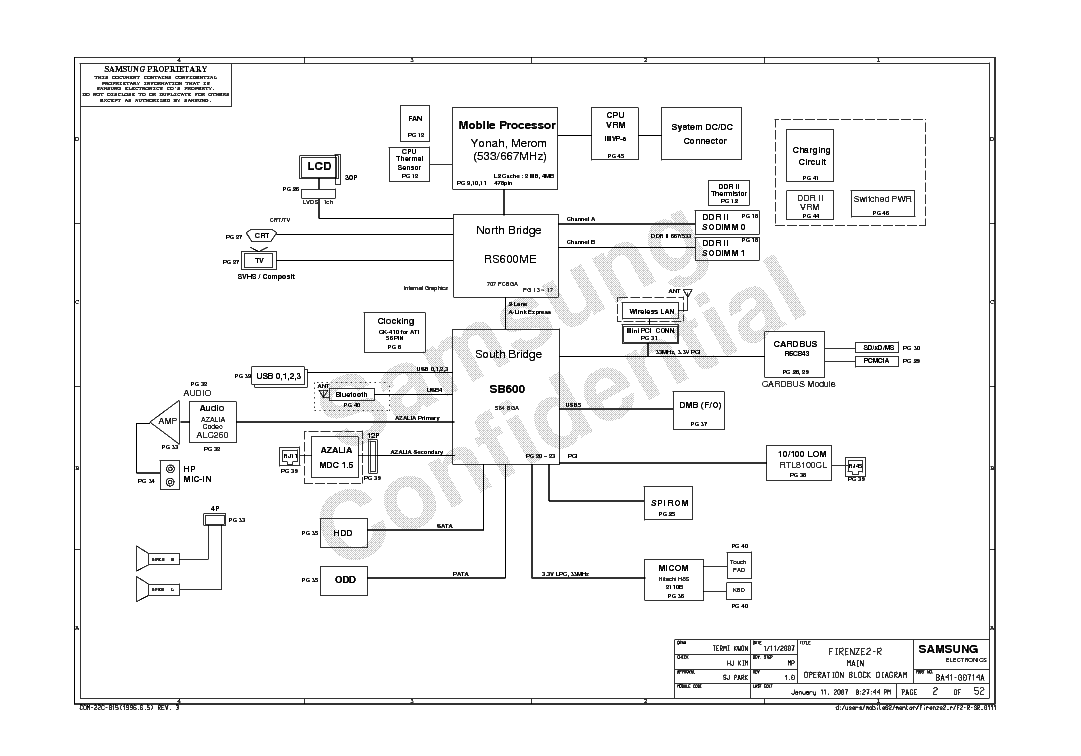
Samsung NP-R40 plus (Firenze2-R)

 Mother Board Samsung NP-R40 plus (Firenze2-R) Schematics Download Free.


As our field is computers and laptops we are here trying to provide as much stuff as possible for free to make our contribution. We are believing in reviving the technology and making minimum electronics waste,  At this platform, you can download schematics diagrams, Board view, Learning Videos, and other relative materials to make it possible to repair.


Schematic Diagram is a drawing that shows all of the components of a circuit. This drawing shows the electrical connections between one device to another and its functions for a specific circuit arrangement. A drawing shows all of the components of a circuit by means of graphical symbols, liens, and some specific shapes. The schematic diagram is used to trace the circuit and its functions. Circuit diagrams are widely used for circuit design and maintenance of electrical and electronic equipment. Schematic diagrams facilitate the technicians to resolve their problems. Circuit diagrams are widely used for Laptop/Desktop Mother Board repairing. Technicians can save time if they use circuit diagrams to resolve problems.

 Schematics Download  Free

Click Here


Mother Board Samsung NP-R40 plus (Firenze2-R) Board View Download Free.


As you know, schematics and Boardviews are the maps of motherboards and they are very useful in finding the components on the circuit board. Without a schematic and board view files is really a pain full job to troubleshoot the board. Schematic and board view files facilitate the technicians to resolve their problems. Broadview and Schematic are widely used for Laptop/Desktop Mother Board repair. Technicians can save time if they use Schematic and board view files to resolve their problems. If you want to repair your water-damaged or faulty Motherboard, you will need a schematic (.PDF) and board view (.BRD, .BDV, .fz,) file. The purpose of this site is to provide the necessary board views and schematics for download to your repair. I am sure this fixing information could be a profitable alternative than change a new costly motherboard with not sure available

     Board View Download Free (Coming soon)

If anyone has this board view file, please comment link below 


If you don't have BoardView Software Here you can Download Latest Board Viewer Software for free

Learn how to download and Install BoardView Software Click Here

Mother Board Samsung NP-R40 plus (Firenze2-R) Bios Bin Download Free.


Bios which is (a basic input-out system) and is advanced into UEFI (unified extensible firmware interface), is a program that contains communication protocols between different ICs and also contains hardware initialization processes to safely start a computer system, it also manages power flow to different motherboard parts and senses temperature and detects peripherals. It runs when we plug the power in till we are running different tasks in our OS. It continuously provides information about hardware to OS as well. This is a program that connects hardware to hardware and to software as well. This is why it is also called “firmware”.

Always remember! First Backup your old Bios chip and save it at (USB or Hard drive) then copy the downloaded Bios bin file into the Bios chip. Sometimes the machine states changed after programming the bios chip. it is a good practice to save yourself.


Bios +EC Bin Download Free  (Coming soon)


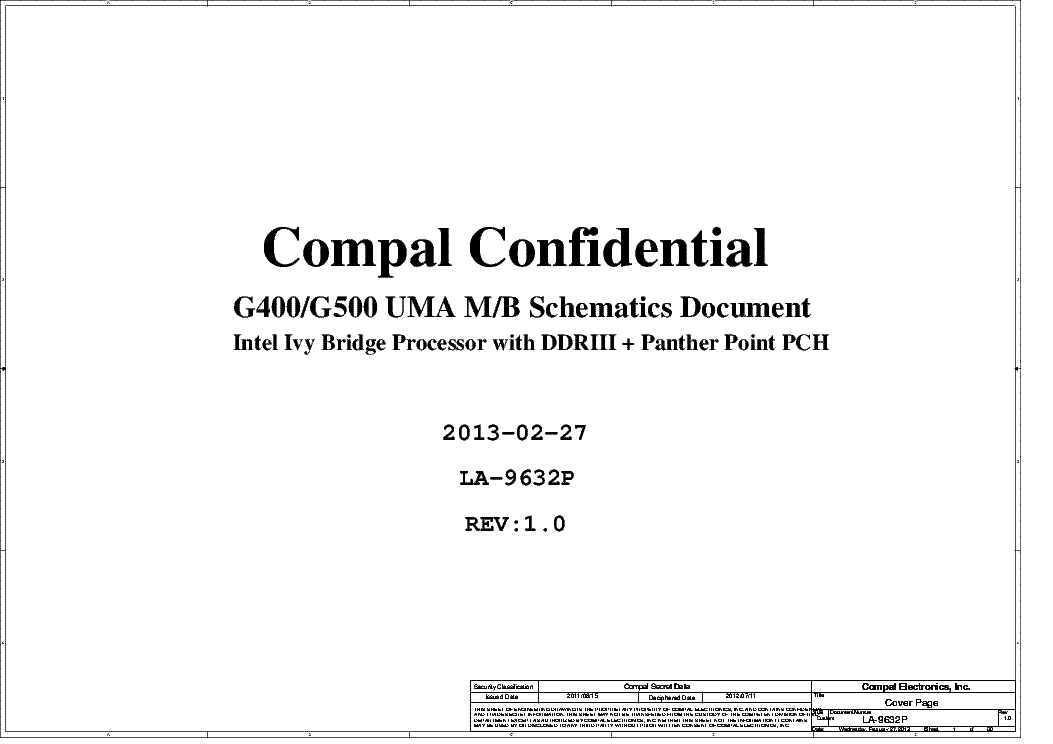
lenovo_g500_compal_la-9632p_r1.0

 Mother Board lenovo_g500_compal_la-9632p_r1.0 Schematics Download Free.


As our field is computers and laptops we are here trying to provide as much stuff as possible for free to make our contribution. We are believing in reviving the technology and making minimum electronics waste,  At this platform, you can download schematics diagrams, Board view, Learning Videos, and other relative materials to make it possible to repair.


Schematic Diagram is a drawing that shows all of the components of a circuit. This drawing shows the electrical connections between one device to another and its functions for a specific circuit arrangement. A drawing shows all of the components of a circuit by means of graphical symbols, liens, and some specific shapes. The schematic diagram is used to trace the circuit and its functions. Circuit diagrams are widely used for circuit design and maintenance of electrical and electronic equipment. Schematic diagrams facilitate the technicians to resolve their problems. Circuit diagrams are widely used for Laptop/Desktop Mother Board repairing. Technicians can save time if they use circuit diagrams to resolve problems.

 Schematics Download  Free

Click Here


Mother Board lenovo_g500_compal_la-9632p_r1.0 Board View Download Free.


As you know, schematics and Boardviews are the maps of motherboards and they are very useful in finding the components on the circuit board. Without a schematic and board view files is really a pain full job to troubleshoot the board. Schematic and board view files facilitate the technicians to resolve their problems. Broadview and Schematic are widely used for Laptop/Desktop Mother Board repair. Technicians can save time if they use Schematic and board view files to resolve their problems. If you want to repair your water-damaged or faulty Motherboard, you will need a schematic (.PDF) and board view (.BRD, .BDV, .fz,) file. The purpose of this site is to provide the necessary board views and schematics for download to your repair. I am sure this fixing information could be a profitable alternative than change a new costly motherboard with not sure available

     Board View Download Free (Coming soon)

If anyone has this board view file, please comment link below 


If you don't have BoardView Software Here you can Download Latest Board Viewer Software for free

Learn how to download and Install BoardView Software Click Here

Mother Board lenovo_g500_compal_la-9632p_r1.0 Bios Bin Download Free.


Bios which is (a basic input-out system) and is advanced into UEFI (unified extensible firmware interface), is a program that contains communication protocols between different ICs and also contains hardware initialization processes to safely start a computer system, it also manages power flow to different motherboard parts and senses temperature and detects peripherals. It runs when we plug the power in till we are running different tasks in our OS. It continuously provides information about hardware to OS as well. This is a program that connects hardware to hardware and to software as well. This is why it is also called “firmware”.

Always remember! First Backup your old Bios chip and save it at (USB or Hard drive) then copy the downloaded Bios bin file into the Bios chip. Sometimes the machine states changed after programming the bios chip. it is a good practice to save yourself.


Bios +EC Bin Download Free 


Featured Post

The Battle of Browsers: Microsoft Edge vs. Google Chrome

Unveiling the Key Differences and Choosing the Perfect Fit Discover the ultimate showdown between Microsoft Edge and Google Ch...

Translate

AdBlock Detected!

Please support Genius Mind Technologies by disabling your AdBlocker. We rely on ads to keep our massive library of free schematics, boardviews, and BIOS bin files free for everyone.