Genius Mind Technologies: Expert Repairs & Free Tech Resources
Need a reliable, chip-level laptop motherboard repair in Sri Lanka?
We specialize in fixing dead boards, no-display errors, and complex BIOS reprogramming.
For the tech community, we host a massive, open-access library of free schematics, boardviews, and BIOS bin files for laptops, desktops, and VGA cards—absolutely no registration required. Fast, reliable, and built for tech enthusiasts!
Click Here to Watch online freeDon't judge a book (or movie) by its cover! "Underpants Thief," a 2021 Sri Lankan drama, dives deeper than missing laundry. This heartwarming story follows a family navigating a brother's unique challenge and the importance of acceptance.
Expect:
A comedic look at a sensitive topic
A journey of family love and support
A heartwarming message about embracing differences
The Iris BSW MB 14279-1 (REV: A00) is the main logic board found in the Dell Inspiron 3452 (and often the 15-inch 3552 variant). This board is based on the highly integrated Intel Braswell (BSW) SoC architecture, meaning the CPU, GPU, and chipset are combined into a single BGA chip (typically a Celeron or Pentium processor).
Brand / Model: Dell Inspiron 3452
Board Number: Iris BSW MB 14279-1
Revision: REV: A00
Architecture: Intel Braswell (SoC)
Common Chip-Level Faults & Repair Notes
Because the Braswell architecture is a highly integrated SoC design, troubleshooting the Dell Inspiron 3452 requires specific attention:
Dead SoC (System-on-Chip): The CPU/Chipset combo is prone to failure from thermal stress or power surges on the USB ports (since the USB controller is integrated into the SoC). If the main 3.3V/5V rails are present but there is a dead short on the CPU VCORE, the SoC must be replaced.
BIOS Corruption (No Display / 7 Beeps): Very common on Dell laptops. A corrupt BIOS or failing CMOS battery will prevent POST. Reprogramming the BIOS chip with a clean bin file is the first diagnostic step.
Power Sequence Issues: Use the provided boardview to trace the embedded controller (EC) signals (like ACIN, RSMRST#, and PWRBTN#) to verify power logic.
The Battle of the Browsers (2024): Microsoft Edge vs. Google Chrome
In the vast landscape of web browsers, two heavyweights dominate the market: Microsoft Edge and Google Chrome. Because both browsers are now built on the same Chromium engine, they share identical core performance and extension compatibility. However, in 2024, the battle has shifted from rendering speed to resource efficiency, AI integration, and ecosystem synergy. Which browser is the perfect fit for you? Let's dive in.
1. RAM, CPU & Battery Efficiency
While Chrome has made strides with its "Memory Saver" feature, Microsoft Edge takes the crown for resource management. Edge utilizes built-in Sleeping Tabs and Efficiency Mode, aggressively putting background tabs to sleep to free up RAM and reduce CPU usage. If you are using a laptop on battery power or a PC with limited RAM, Edge provides a noticeably smoother multitasking experience.
2. Google Chrome: The Minimalist Ecosystem
Google Chrome remains the most popular browser in the world for a reason. Its UI is starkly minimalist, putting the webpage front and center without cluttering the screen with sidebars. Furthermore, Chrome is heavily integrated into the Google ecosystem (Gmail, Drive, Docs, Android). If your digital life revolves around a Google Account and you prefer a clean, distraction-free interface, Chrome is unmatched.
3. Microsoft Edge: Productivity & AI Features
Edge is designed for power users who want their browser to do more. The standout feature in 2024 is the deep integration of Microsoft Copilot AI directly into the sidebar, allowing you to summarize webpages, draft emails, and ask complex questions without opening a new tab. Additionally, Edge offers natively supported Vertical Tabs, Split Screen views, and Collections, making it a productivity powerhouse for researchers and students.
4. Privacy and Security
Because Google's primary business model relies on advertising, Chrome's privacy settings are functional but not inherently aggressive. Microsoft Edge offers a much stronger out-of-the-box privacy stance with its built-in Tracking Prevention. You can easily toggle between "Basic, Balanced, and Strict" modes to block third-party trackers, preventing ads from following you across the web.
The Verdict: Which Browser Is Right for You?
Ultimately, the decision between Edge and Chrome depends entirely on your workflow:
Choose Google Chrome if: You prefer a simple, uncluttered interface, you rely heavily on Google Workspace, and you use an Android smartphone.
Choose Microsoft Edge if: You use a Windows PC, want to save RAM/battery, love built-in AI tools (Copilot), and prefer vertical tabs for managing heavy workloads.
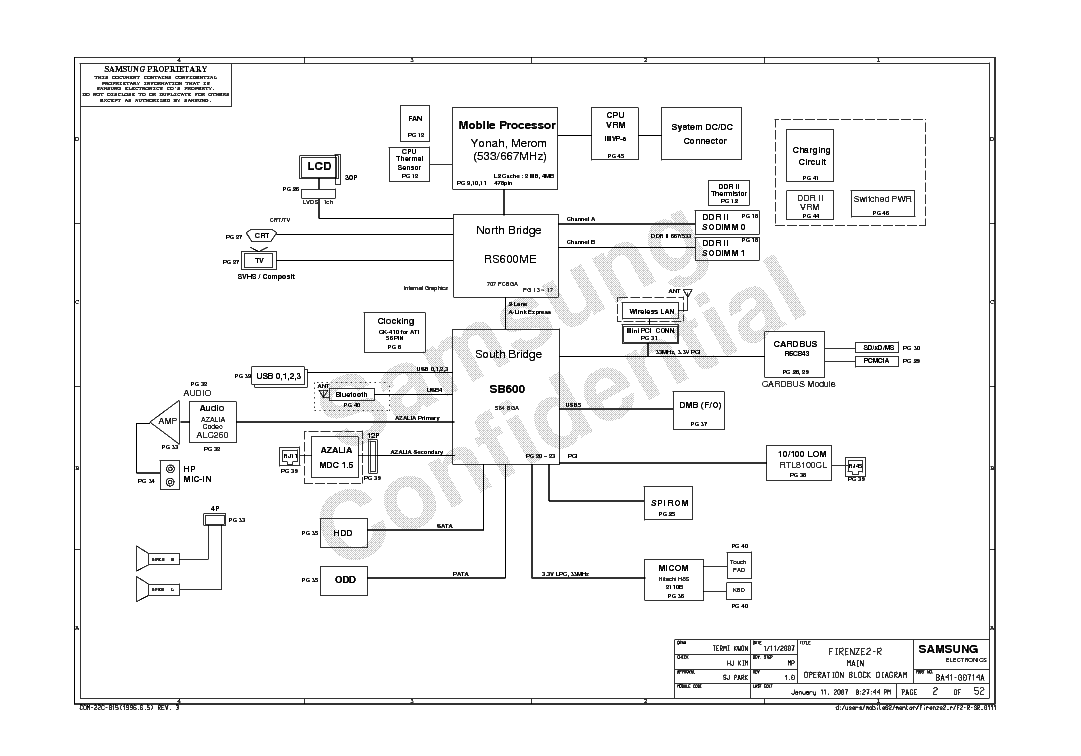
Samsung NP-R40 Plus Motherboard (Firenze2-R) Schematics & BIOS
Motherboard Specifications
The Firenze2-R is the internal motherboard designation for the classic Samsung NP-R40 Plus laptop series. This board represents an earlier era of laptop architecture, often utilizing Intel Core 2 Duo processors paired with an ATI Radeon chipset (such as the Radeon Xpress 200M/1250). It remains a popular board for technicians learning trace repairing and vintage laptop restoration.
Brand / Model: Samsung NP-R40 Plus
Motherboard Part Number: Firenze2-R (Rev 1.0)
Processor Support: Intel Core 2 Duo / Pentium Dual-Core
Memory Support: DDR2 RAM
Common Chip-Level Faults & Repair Notes
When working on the Samsung NP-R40 Plus (Firenze2-R), be aware of these common failure points due to its age:
Graphics/Chipset Failure: The ATI chipset on this board is prone to failure due to long-term heat exposure. Reballing or replacing the BGA chip is often necessary if you get no display but the fan spins.
Degraded Capacitors: Due to the age of the board, electrolytic capacitors may have dried out, causing random freezing or sudden power loss.
No Power: Always check the primary 19V rail near the DC jack. The protection MOSFETs on older Samsung boards often fail.
Free Download Section
1. Samsung NP-R40 Plus (Firenze2-R) Schematic Diagram (.PDF)
Trace power rails, component pins, and IC communication lines with the full schematic.
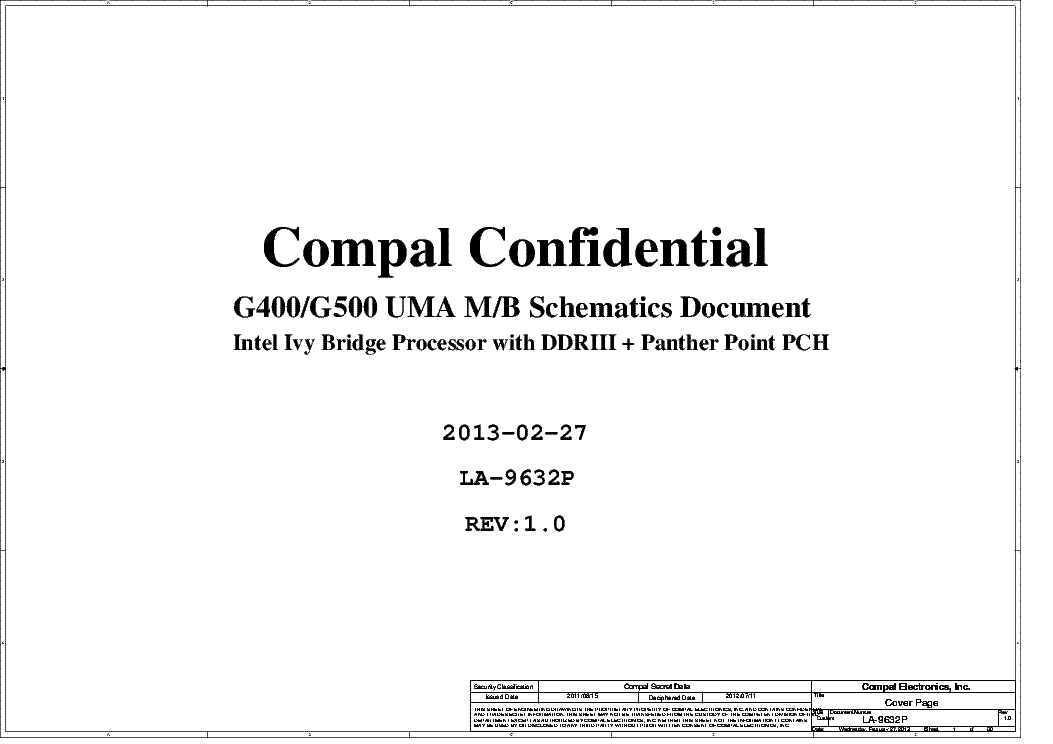
The Compal LA-9632P (Rev 1.0) is the primary motherboard used in the Lenovo G500 laptop series. This board is built around the Intel HM76 Express Chipset and typically supports Intel 3rd Generation Core i3, i5, and i7 processors (Ivy Bridge). Some variations include discrete AMD Radeon graphics (like the HD 8570M or 8750M).
Brand / Model: Lenovo G500
Motherboard Part Number: Compal LA-9632P
PCB Revision: Rev 1.0
Chipset: Intel HM76
Common Chip-Level Faults & Repair Notes
If you have a dead or malfunctioning Lenovo G500 (LA-9632P), here are key areas to inspect:
No Power (Dead): Check the DC-IN MOSFETs and the main 19V rail (B+). Short circuits in ceramic capacitors on the 19V line are common.
3.3V / 5V Standby: Ensure the SY8208B/SY8208C standby ICs are outputting correct voltages. A hot standby IC usually points to a shorted KBC/EC (KB9012QF).
No Display: Very often linked to corrupted main BIOS or EC firmware. Programming the KB9012 EC and main BIOS is a standard fix.
The Inventec DAKAR10F / DAKAR10FG is a very common motherboard found inside the Toshiba Satellite C850 and C855 models. This board typically features Intel's HM70 or HM76 chipset, supporting Intel 2nd and 3rd Generation processors (Sandy Bridge / Ivy Bridge), and uses standard DDR3 memory.
Before replacing the entire motherboard on a Toshiba C850 / C855, check these frequent failure points:
Corrupted BIOS: Extremely common on this series. The laptop may power on with a blank screen, or the fan will spin at 100% with no POST. A BIOS reflash (file provided below) often brings it back to life.
HM70/HM76 Chipset Failure: If the laptop powers on for exactly 30 minutes and then shuts off, you might have an HM70 chipset paired with an unsupported Core i3/i5/i7 (Intel anti-theft restriction) or a failing PCH.
No Power (19V Short): Inspect the ceramic capacitors around the CPU VRM and main power rail. A shorted capacitor will trigger the charger's protection circuit.
Toshiba Satellite L500 (Compal LA-4982P) Schematics & BIOS Bin
Motherboard Specifications
The Compal LA-4982P (KSTAA) is the primary motherboard used in the popular Toshiba Satellite L500 series laptops. These boards generally feature the Intel GM45 / PM45 chipset architecture paired with Core 2 Duo processors.
Brand / Model: Toshiba Satellite L500
Manufacturer: Compal
Board Number: LA-4982P (KSTAA)
Architecture: Intel Core 2 Duo / GM45 / PM45
Common Chip-Level Faults & Repair Notes
If you're troubleshooting a dead Toshiba L500 / LA-4982P, consider these frequent issues:
NEC/Tokin Capacitor (Proadlizer) Failure: This era of Toshiba laptops is notorious for NEC/Tokin capacitor degradation under the CPU socket. Symptoms include the laptop shutting off abruptly under load, freezing, or only running on battery power. Replace it with 4x 330uF Tantalum capacitors.
No Display / Black Screen: Often caused by a corrupted BIOS or a failing Northbridge (GM45/PM45). Try flashing a clean BIOS first (provided below).
DC Jack / Power Issues: Check the input MOSFETs and the main 19V rail near the charging IC for shorts.
Expert Laptop Repair Services in Kandy Need Your Laptop Fixed Fast? At Genius Mind Technologies , we specialize in...
AdBlock Detected!
Please support Genius Mind Technologies by disabling your AdBlocker. We rely on ads to keep our massive library of free schematics, boardviews, and BIOS bin files free for everyone.

 Click Here to Watch online freeDon't judge a book (or movie) by its cover! "Underpants Thief," a 2021 Sri Lankan drama, dives deeper than missing laundry. This heartwarming story follows a family navigating a brother's unique challenge and the importance of acceptance.